


Tim Hortons
3.23.63K Reviews
App Specs
- Version
- 7.1.567
- Updated On
- License
- Free
- Downloads
- 5,000,000+
- Developer
- The TDL Group Corp.
- Categories
- Food & Drink
- Platform
- Android
Screenshots
 Analysis by AppCompare
I use the Tim Hortons app as a practical companion for ordering coffee, breakfast, and other menu items before I reach a restaurant. It is a focused Food & Drink app rather than an attempt to replace every food-ordering service, and that narrow purpose is mostly its strength. When I already know I want Tim Hortons, the app can make the visit more organized than standing in line and trying to decide at the counter.
My overall impression is positive but not uncritical. The app is free to install, easy to understand, and useful for repeat customers who want to customize an order. At the same time, its value depends heavily on how often you visit Tim Hortons and how smoothly the selected location handles mobile orders. If you only stop in occasionally, or if you want to compare many restaurants in one place, a general delivery or restaurant-discovery app may suit you better.
What the Tim Hortons app is really useful for
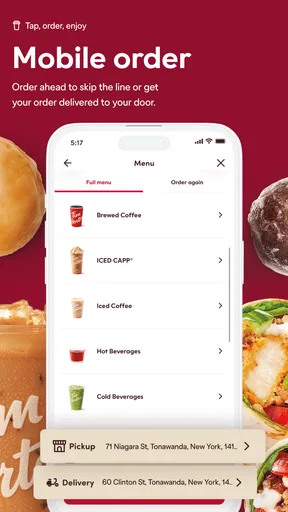
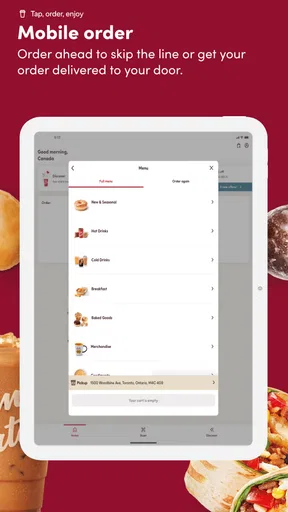
Tim Hortons is developed by The TDL Group Corp. and is built around a simple routine: choose a restaurant, select food or drinks, adjust the order, and submit it for collection or another available ordering option. The store summary describes the central idea accurately, but the practical benefit is less about browsing and more about reducing repeated decisions.
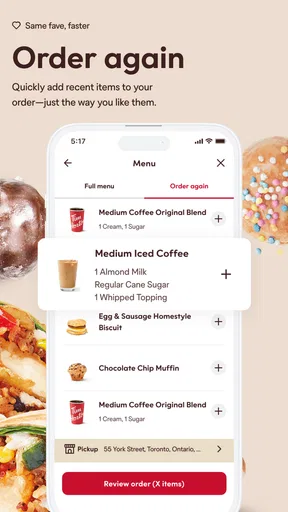
I find the app most useful when I have a familiar order. Instead of explaining the same drink changes every time, I can work through the menu digitally and check the choices before paying. That is especially handy during a rushed morning, when a small mistake in a coffee order is more annoying than it should be. The screen gives me a moment to review the item, quantity, and customization before I commit.
The app is free, with no purchase price required simply to download or use it. That matters when judging its value: the financial question is not whether the app itself is worth buying, but whether it saves enough time and ordering effort to justify keeping it on my phone. The food and drinks remain separate purchases, so the app should be viewed as an ordering tool rather than a way to make the underlying visit free.
Its age rating is Everyone, which fits the straightforward nature of the service. The application was released on July 27, 2017, and the current version is 7.1.567. It supports Android 7.0 or later. Those details make it accessible to people using older compatible Android phones, although a supported operating system does not automatically guarantee that every device will feel equally quick or modern.
A realistic morning with the app
Imagine leaving home late for work and wanting a coffee plus something small to eat. I can open the app, select a nearby Tim Hortons, build the order while waiting for a bus, and review the drink modifications before sending it. Once I arrive, the useful part is that the ordering conversation has already happened on screen. I still need to allow time for preparation and collection, but I am not starting from zero at the counter.
Worth Reading Before You Choose

EA SPORTS FC Mobile 26 Is a Bigger Football Game, but It Takes Time

Flipboard Shows What News Apps Must Do Beyond the Feed

Switching to Android Auto Means Rethinking Your Driving Routine

Google Calendar Makes a Crowded Week Easier to Manage

Ludo King Makes the Most of the Minutes Between Plans

Baby Panda World Brings Quick Play to Modern Phones, but Its Game Library Feels Busy
There is an important practical distinction here: placing an order does not mean the food will be ready the instant I walk through the door. Busy periods, a crowded restaurant, or a location that is handling many orders can reduce the time advantage. I therefore treat the app as a way to get the order started, not as a guarantee of instant service.
Customization is more valuable than simple menu browsing
The obvious use is choosing an item, but the more helpful use is checking whether the order reflects what I actually want. Digital customization is useful for drinks because small changes can be easy to mishear in a noisy restaurant. It also gives me a written review point before submission, which is a better safeguard than relying on memory after a quick verbal exchange.
My advice is to build the order slowly the first time. Pay attention to the selected size, quantity, and drink adjustments, then look over the complete basket before confirming. On later visits, that habit makes repeat ordering faster. It also prevents a common mistake with restaurant apps: assuming that tapping the familiar item automatically reproduces every preference from a previous visit.
Another useful workflow is to separate “what I usually get” from “what I am ordering today.” I may normally want one drink, but a meeting or family stop can change the quantity. Reviewing the basket as a complete order helps catch accidental duplicates and makes the app more reliable for group collection. I would not skip that check just because the interface feels familiar.
How it compares with ordering at the counter
Ordering in person remains better when I need advice, have an unusual request, or have not decided what I want. A staff member can respond naturally to questions, while an app expects me to navigate the available choices myself. Counter ordering is also more flexible when plans change at the last moment, because I can explain the situation directly instead of editing a digital basket.
The app is stronger when the order is predictable. It gives me time to inspect the selection, reduces the need to repeat details, and can make a regular coffee stop feel more controlled. That advantage is modest, but it is real. I would not install it for a single visit; I would install it if Tim Hortons is already part of my routine.
Compared with a general delivery app, the Tim Hortons app has a more direct relationship with the chain’s menu and ordering process. A general service can be better for comparing restaurants, combining items from different places, or arranging delivery across a broader range of businesses. The dedicated app makes more sense when I have already chosen Tim Hortons and want a focused route from menu to order.
Where the free price creates genuine value
Because the app itself costs nothing, the main benefit is convenience rather than monetary savings. I value it when it removes a repeated task from a routine I already have. If I visit regularly, even a small reduction in ordering friction can add up in practical terms: fewer decisions at the counter, easier customization, and a clearer record of what I intended to order.
That does not mean every user receives the same value. Someone who rarely visits may spend more time installing, signing in, and learning the menu than they save. A person who prefers to decide after seeing the restaurant may also find the app unnecessary. Free access removes the financial barrier, but it does not remove the time cost of using another app.
The app has attracted over five million installs, with an average rating of 3.2 from around 146 thousand ratings and roughly 3.6 thousand written reviews. Those figures suggest broad awareness and a substantial user base, while the middling average is a reminder that convenience apps are judged by real-world reliability as much as by their menus. I read that rating as a reason to keep expectations practical rather than assuming every order will be effortless.
Tradeoffs I noticed during regular use
The biggest tradeoff is control versus flexibility. The app gives me more control over a planned order, but less conversational flexibility than a person at the counter. If I am unsure what a menu choice means, the digital route can feel slower because I must interpret the available options without immediate clarification.
There is also a timing tradeoff. Starting an order early can help me avoid a queue, but ordering too early may be inconvenient if my plans change or I are delayed. I prefer to prepare the basket in advance and submit it when I am reasonably sure about my arrival. That small adjustment makes the app feel more useful and avoids treating the pickup estimate as a promise.
Another limitation is that the app is most valuable inside the Tim Hortons ecosystem. It does not solve the problem of choosing between a nearby independent café, another chain, and Tim Hortons. If my priority is the best available option in a neighborhood, I would rather use a broader search or delivery service. The dedicated app becomes compelling only after the restaurant decision is already made.
Users should also remember that a digital menu can encourage over-ordering. Browsing while hungry makes it easy to add another drink or snack simply because it is visible. I find it helpful to decide the basics first, customize only what matters, and then review the total basket once. The app makes ordering convenient, but convenience can work in both directions.
Who will get the most from it
I would recommend it to regular Tim Hortons customers, commuters, students, and anyone who tends to repeat the same customized drinks. It is particularly useful for people who dislike explaining detailed orders aloud or who want a quiet moment to check their choices. Families can also benefit when one person is collecting several items, provided that person carefully reviews quantities before submitting.
It can also help someone who has a tight schedule but a predictable route. Preparing an order during a short break is more practical than waiting until reaching the restaurant, especially when the visit is routine. The strongest value appears when the app becomes part of an existing habit rather than a new habit created solely because the app exists.
I would be more cautious about recommending it to occasional visitors, indecisive customers, or people who need delivery comparison across several restaurants. It is also not my first choice when an order involves a complicated conversation or when I need staff guidance. In those cases, the counter can be faster and less confusing despite the queue.
Questions worth answering before installing
Is it free? Yes, the app is free to install and use as an ordering application. That should not be confused with free food: menu purchases are still separate, and the app’s value comes from convenience rather than eliminating the cost of the order.
Will it work on an older Android phone? It requires Android 7.0 or later, so many older devices can meet the basic operating-system requirement. Performance can still vary by phone, connection, and the condition of the device. I would keep the app updated when possible, especially if ordering is important during a busy commute.
Is it better than ordering at the restaurant? Not universally. It is better for planned, familiar, customizable orders. In-person ordering is better when I need help, want to change everything at the last second, or have not decided what to buy. The right choice depends on whether certainty or flexibility matters more for that visit.
Does placing an order guarantee no waiting? No responsible review should treat mobile ordering as a guarantee of immediate pickup. The app can move the ordering step earlier, but preparation still depends on the selected restaurant and how busy it is. I use it to reduce uncertainty, not to assume the food will be waiting the moment I arrive.
Is it suitable for everyone? The Everyone content rating makes it broadly approachable, and the interface is aimed at ordinary food ordering rather than a specialist audience. Still, people who do not visit Tim Hortons regularly may find a general restaurant app more useful because it offers wider choice and comparison.
My verdict on the value
After using it as a repeat-ordering tool, I see Tim Hortons as a sensible free app with a clearly defined job. It does not need elaborate extras to be useful: selecting a restaurant, customizing food and drinks, and checking the basket can make a familiar visit more manageable. The benefit is strongest when I already know what I want and when the selected location is convenient for collection.
Its weaknesses are equally clear. It cannot replace personal advice, it does not make restaurant preparation instantaneous, and it is not the best option for comparing many food businesses. The average rating of 3.2 also supports a measured recommendation rather than blind enthusiasm. I would keep expectations focused on ordering convenience and judge the app by how well it fits my own routine.
My buy-or-skip verdict is simple: download it if you visit Tim Hortons often enough to value repeat ordering and drink customization. Skip it if you are only making an occasional stop, prefer choosing at the counter, or mainly want a broad marketplace with multiple restaurants. Since access is free, the decision costs little financially; the real question is whether this dedicated ordering workflow saves you enough time and effort to become part of your day.
For me, that makes it worth keeping when I have a regular Tim Hortons route. I would not call it essential, and I would not use it for every possible food-ordering situation, but it delivers practical value in the situation it was designed for. Used with a careful basket check and realistic expectations about preparation time, it is a useful companion rather than a replacement for the restaurant itself.
Pros
- Convenient mobile ordering helps reduce waiting time during busy periods.
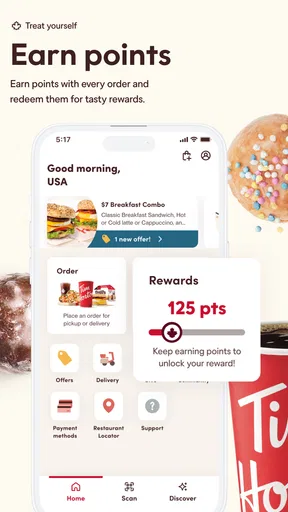
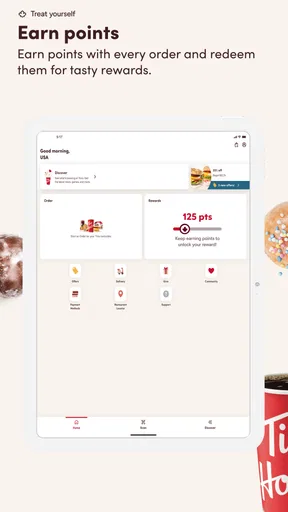
- Rewards points can be earned on eligible purchases and redeemed for menu items.
- The app makes it easy to locate nearby restaurants and check opening hours.
- Menu browsing includes customization options for many drinks and food items.
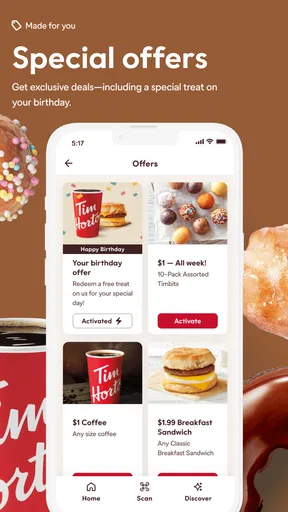
- Users can often find app-exclusive deals
- coupons
- and limited-time promotions.
Cons
- Some locations may not support every ordering or customization feature.
- Rewards
- offers
- and menu availability can vary by restaurant and region.
- Busy stores may delay pickup orders despite the estimated preparation time.
- The app may request location and notification permissions for full functionality.
- Frequent promotions can make the interface feel crowded and harder to navigate.
FAQs for Tim Hortons
What can I do with the Tim Hortons app?
The Tim Hortons app lets you browse the restaurant menu, customize eligible food and drink orders, find nearby locations, and place orders for pickup or, where available, delivery. It also provides access to the Tims Rewards program, promotional offers, and account settings. Available features can vary by country, restaurant, operating hours, and local service coverage.
How does Tims Rewards work in the Tim Hortons app?
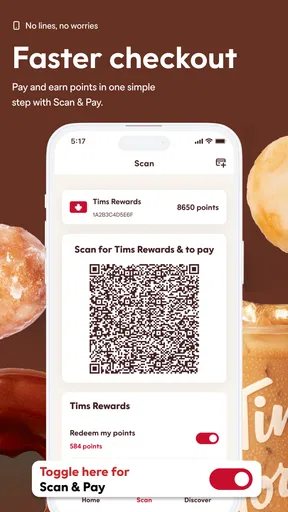
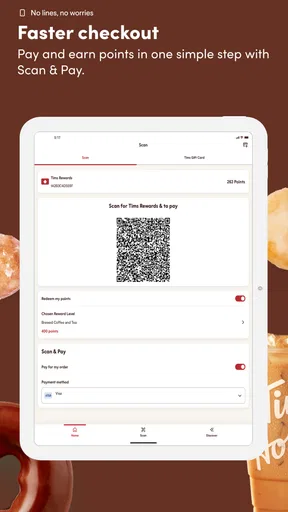
After creating or signing in to a Tim Hortons account, you can collect points through eligible purchases made in the app or by using a linked rewards method at participating restaurants. Points may be redeemed for qualifying menu items, although earning rates, redemption values, exclusions, and expiration policies can change. Always review the current rewards terms before ordering.
Can I order Tim Hortons food and drinks for delivery through the app?
The app may offer delivery in selected areas, but availability depends on your location, nearby restaurant participation, opening hours, and delivery capacity. If delivery is unavailable, you can usually check whether pickup or drive-thru ordering is supported instead. Delivery fees, minimum order requirements, estimated times, and menu availability may differ from in-restaurant purchases.
Does the Tim Hortons app support mobile payment and order customization?
The Tim Hortons app generally supports digital payment methods available in your region and may allow users to save payment details for faster checkout. Many menu items can be customized, such as drink size, milk, flavor, toppings, or other available options. However, customization and payment choices depend on the restaurant, item, country, and current app version.
Is the Tim Hortons app free to download and use?
Downloading and using the Tim Hortons app is generally free, and you do not normally pay a separate fee simply for creating an account or browsing the menu. However, you still pay for food, drinks, applicable taxes, and any delivery or service charges. The app may also require an internet connection, location access for nearby stores, and a compatible Android or iOS device.


